
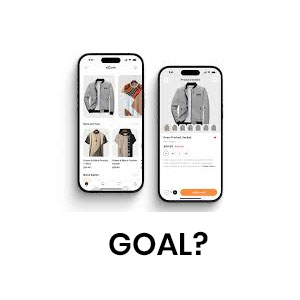
I am running a usability test for an e-commerce app to see how easily users can find and purchase items.
First I will create setup for usability testing for that I need
– 6 people who shop online regularly but haven’t used this app before.
– High-fidelity prototype of the e-commerce app.
– I will be a moderator who will guide the session and observes user behavior.
Preparation before the session
– Define the tasks that I have to explain to the participants.
– Create a script.
– Decide how to record results via notes, screen recording or by observation.
– Prepare test devices (PC, phone, tablet — whichever matches real use).
Introduction
Hello Everyone, My name is Neeraj Aneja and thank you for joining us today. Before we start, I want to let you know that we’re testing the app, not you. There are no right or wrong answers. If you get stuck, that’s okay — it helps us learn where things can be improved. “I’d like you to think out loud as you go. Just share what you’re trying to do, what you expect, and what’s confusing. This will help us understand your thought process.
Some warm-up questions
– How often do you shop online in a typical month?
– What kinds of things do you usually buy online?
– Can you tell me about the last time you bought something from an app or website?
– Do you usually shop on your phone, tablet, or computer?
– Do you prefer using apps or websites when shopping online? Why?
Explain the task to the participants
Task 1 – Finding a product
Imagine you want to buy a pair of running shoes under $100. Please show me how you would do that in this app.
Task 2 – Finding a product
Now that you’ve found shoes you like, please add them to your cart.
Task 3 – Checkout
Finally, please go ahead and proceed to checkout, and choose a payment method.

I as a moderator will observe participants without influencing them
– Can users quickly find the search or category filter?
– Do they understand how to sort by price and apply filters?
– Is he able to find add-to-cart button clear?
– Do they hesitate or get confused at checkout?
Once the task is over, I can arrange a open ended discussion with the user hesitate while choosing a payment method.
you can ask these questions from the user.
– I noticed you paused at the payment step — what were you thinking about here?
– Can you tell me what went through your mind when you saw the payment options?
Note : Be careful, Do not influence their answers. Listen carefully what your participants are saying and note it down.
I can ask follow up questions after each task
– How easy or difficult was that task?
– Was anything confusing or unexpected?
– If you could change one thing, what would it be?
End of our session script
That’s the end of our session. Thank you so much for your time — your feedback is really valuable. You’ve helped us find ways to make the app better.
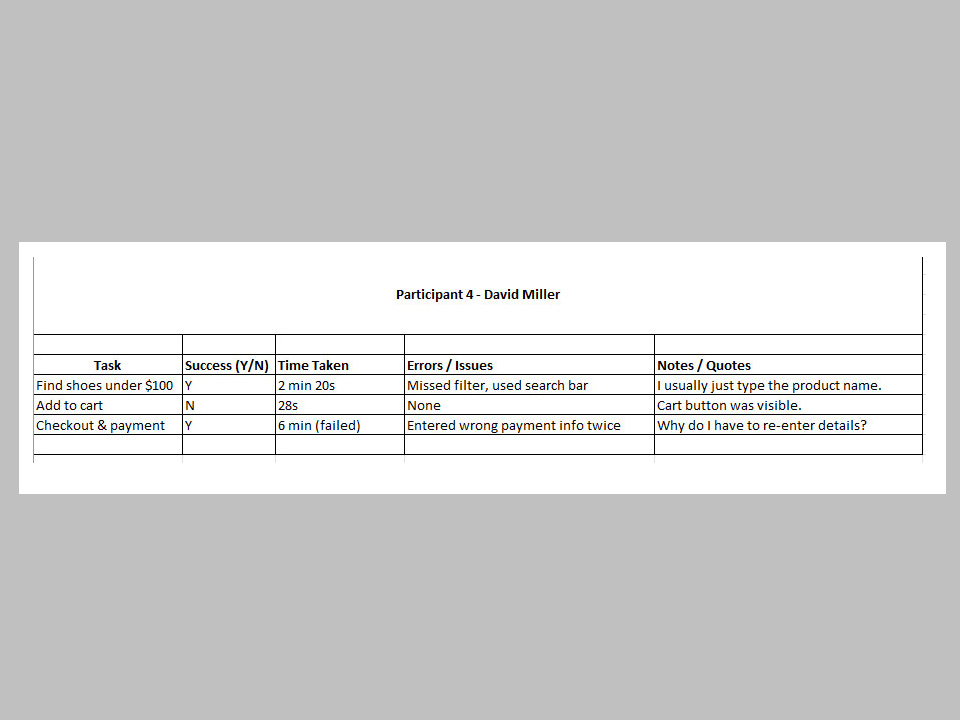
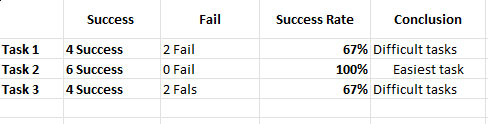
Here is the data I collected during usability testing.
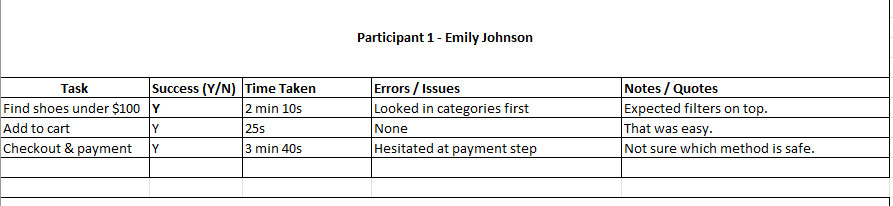
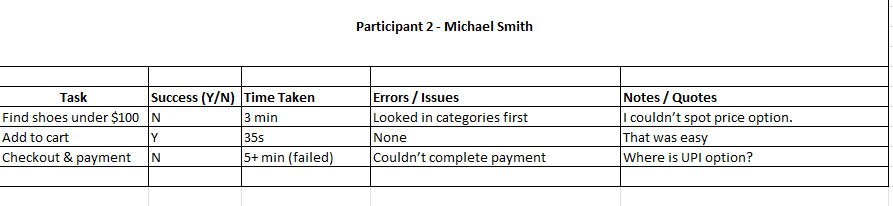
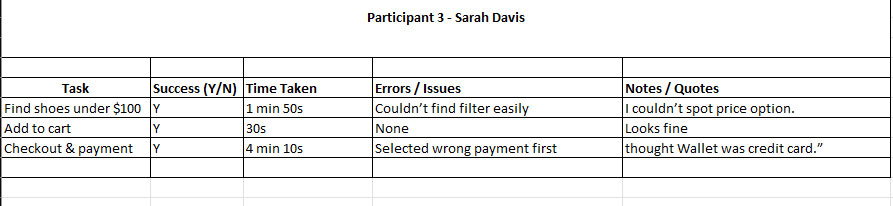
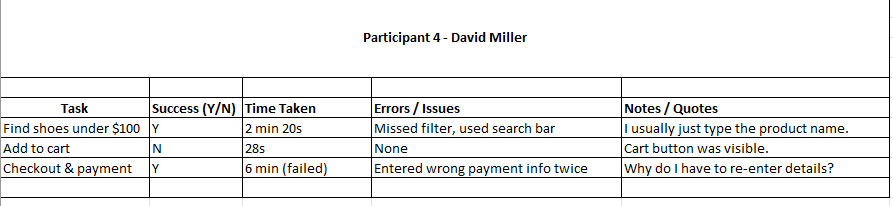
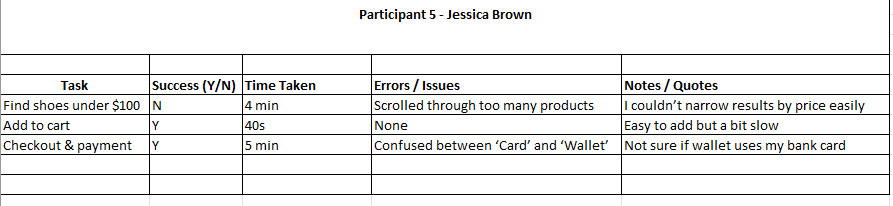
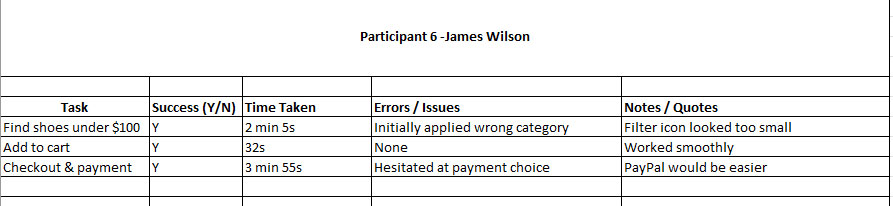
After adding all the data , use formula to find the success rate
Success Rate= (Number of Successes/ Total Participants) ×100

After the session, I will review my notes and observations, conduct a brainstorming session with the team, and compile the results.
Outcome
– 2 out of 6 users couldn’t find the price filter right away.
– 2 users expected a “Buy Now” option instead of only “Add to Cart.”
– Several users hesitated when asked to choose a payment method.
Actionable Insights
– Make the price filter more prominent.
– Add a “Buy Now” button for quicker purchases.
– Simplify the checkout flow with clearer payment instructions.
My Final Result
As per my observation design team should prioritize improvements in Task 1 and Task 3, since both had lower success rates and higher confusion compared to Task 2 (which was smooth).